
Genuine Google reviews are one of the most effective ways to grow a local business. Whether you run a grocery store, a digital marketing agency, or a dental clinic, positive customer feedback builds trust and improves your local search ranking.
This guide provides practical, natural templates and strategies to ask your real customers politely for Google reviews without being desperate.
Quick Answer: How to Ask for a Google Review
- Wait for the right moment: Ask right after a successful transaction, service completion, or positive interaction.
- Use a direct link or QR Code: Copy your unique review link from your Google Business Profile. Or use a Google Review QR Code Generator to make a unique template
- Keep it simple: Send a short, polite message via WhatsApp, SMS, or email.
- Ask for honest feedback: Do not explicitly ask for a “5-star rating.” Ask them to share their genuine experience.
- Say thank you: Always appreciate their time, regardless of the feedback they leave.
Why Google Reviews Matter for Your Business
- Local SEO: Google uses review quantity and quality to rank businesses in local search results and Google Maps.
- Trust and Credibility: Most customers check reviews before visiting a new shop, booking a service, or visiting a clinic.
- Free Marketing: Word-of-mouth recommendations visible to thousands of people cost you nothing.
- Feedback Loop: Honest reviews highlight what your business does well and where it needs improvement.
When Should You Ask for a Review?
Timing depends entirely on your business model. Ask when the positive experience is fresh in the customer’s mind.
| Business Type | Best Time to Ask | Recommended Channel |
| Restaurant / Cafe | Shortly after they finish their meal or pay the bill. | In-person, QR Code on bill, WhatsApp. |
| Salon / Spa | Immediately after the service is completed. | In-person, WhatsApp. |
| Garage / Repair | When handing over the keys or a day after vehicle delivery. | WhatsApp, SMS. |
| Hotel / Resort | During checkout or in the post-stay email. | In-person, Email, WhatsApp. |
| Coaching / Institute | After a major milestone, test, or end of a course. | Email, WhatsApp group, In-person. |
| Retail Store | After purchase, or a few days later for large items. | QR code on receipt, SMS. |
| Doctor / Clinic | Post-visit, keeping the request neutral and private. | SMS, Email, Reception QR Code. |
| Service (Plumber/Electrician) | Upon finishing the job and verifying customer satisfaction. | In-person, W |
How to Ask for a Google Review Without Sounding Pushy
- Keep it short: Customers are busy. Get straight to the point.
- Make it optional: Use phrases like “If you have a minute” or “Whenever you have time.”
- Don’t beg for 5 stars: Asking for “honest feedback” feels authentic and removes pressure.
- Mention the visit: Personalize it by mentioning the specific product or service they purchased.
- Provide one clear link or Share QR Code: Don’t make them search for your business on Google.
How to Create and Share Your Google Review Link or QR Code
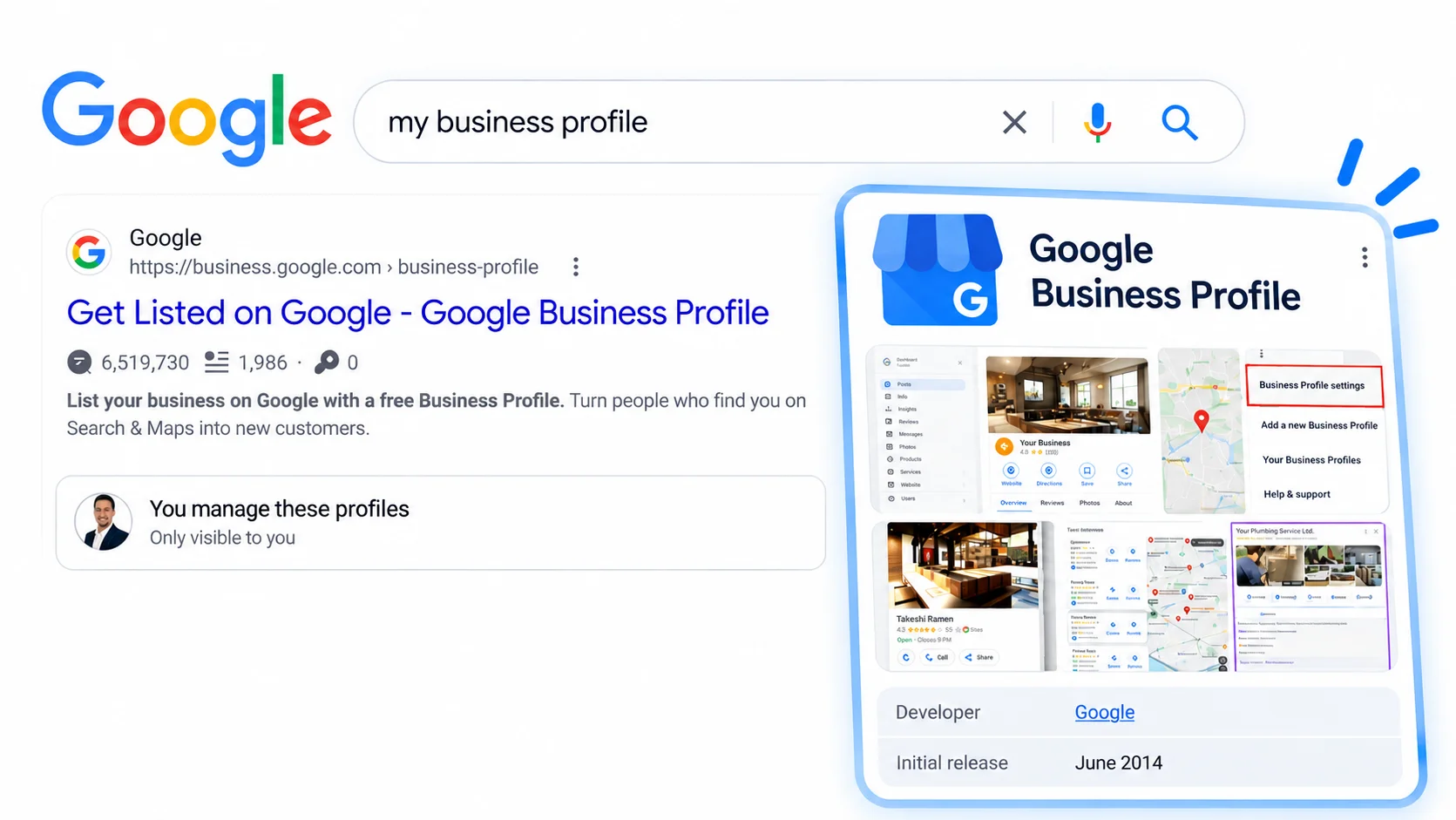
Google Review Link
- Search for “My Business” on Google (make sure you are logged into the account managing your profile).
- Click on the Ask for reviews icon.
- Copy the short link provided (usually looks like
g.page/r/.../review). - Paste this link into your WhatsApp templates, SMS, emails, or use a free online QR code generator to turn the link into a scannable code.
QR Code
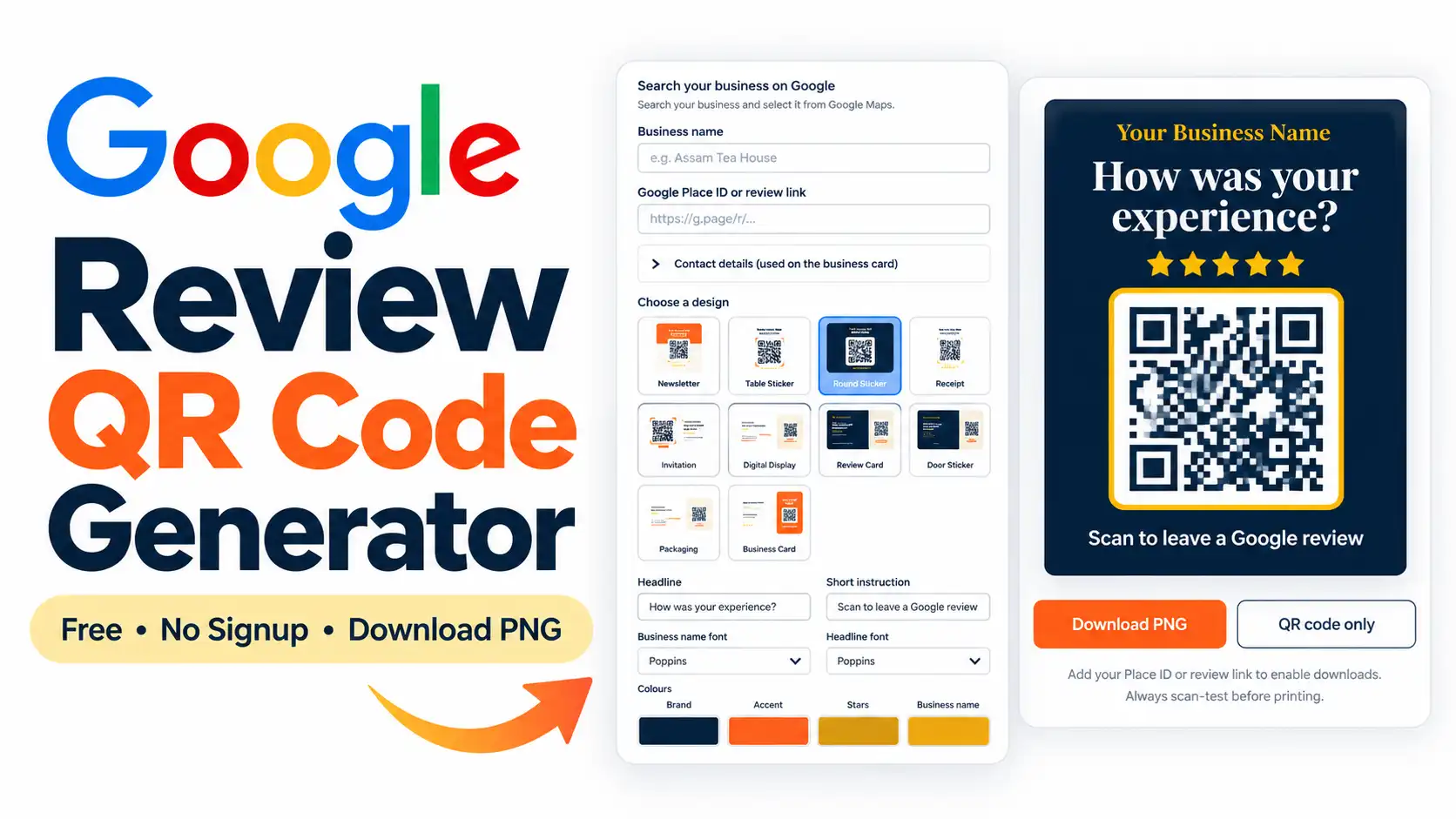
- Go to Google Review QR Code Generator
- Paste your Google My Business Profile Link
- Check the business name.
- Choose a design.
- Write your message.
- Pick fonts and colours.
- Download and Print
10 Most Effective Google Review Request Templates:
These general-purpose templates work for almost any local business.
1. WhatsApp Templates:
- English: Hi [Name], thanks for visiting [Business Name] today. If you have a minute, we’d appreciate your honest feedback on Google: [Link]
- Hindi: नमस्ते [Name], आज [Business Name] आने के लिए धन्यवाद। अगर आपके पास समय हो, तो कृपया Google पर अपना फीडबैक शेयर करें: [Link]
- Assamese: নমস্কাৰ [Name], আজি [Business Name] লৈ অহাৰ বাবে ধন্যবাদ। আপোনাৰ হাতত যদি অলপ সময় আছে, অনুগ্ৰহ কৰি Google ত আপোনাৰ মতামত জনাওক: [Link]
- Bengali: নমস্কার [Name], আজ [Business Name]-এ আসার জন্য ধন্যবাদ। আপনার যদি একটু সময় থাকে, অনুগ্রহ করে Google-এ আপনার মতামত শেয়ার করুন: [Link]
2. Friendly WhatsApp
- English: Hi [Name], it was great seeing you today at [Business Name]. We hope you enjoyed your visit! We’re always trying to improve, so if you’d like to share your experience, you can leave a quick review here: [Link]
- Hindi: नमस्ते [Name], आज [Business Name] में आपसे मिलकर अच्छा लगा। उम्मीद है आपका अनुभव अच्छा रहा होगा। अगर आप अपना अनुभव शेयर करना चाहें, तो यहाँ रिव्यू दे सकते हैं: [Link]
- Assamese: নমস্কাৰ [Name], আজি [Business Name] ত আপোনাক লগ পাই ভাল লাগিল। আশা কৰোঁ আপোনাৰ অভিজ্ঞতা ভাল আছিল। আপুনি বিচাৰিলে আপোনাৰ অভিজ্ঞতা ইয়াত শ্বেয়াৰ কৰিব পাৰে: [Link]
- Bengali: নমস্কার [Name], আজ [Business Name]-এ আপনার সাথে দেখা হয়ে ভালো লাগল। আশা করি আপনার অভিজ্ঞতা ভালো ছিল। আপনি চাইলে আপনার অভিজ্ঞতা এখানে শেয়ার করতে পারেন: [Link]
3. Professional WhatsApp
- English: Dear [Name], thank you for choosing [Business Name]. Providing excellent service is our priority. We would highly appreciate it if you could take a moment to leave a Google review regarding your recent experience: [Link]
- Hindi: प्रिय [Name], [Business Name] को चुनने के लिए धन्यवाद। बेहतरीन सर्विस देना हमारी प्राथमिकता है। यदि आप अपने अनुभव के बारे में Google पर एक रिव्यू छोड़ सकें, तो हम आभारी होंगे: [Link]
- Assamese: প্ৰিয় [Name], [Business Name] বাছনি কৰাৰ বাবে ধন্যবাদ। উন্নত সেৱা প্ৰদান কৰাই আমাৰ লক্ষ্য। অনুগ্ৰহ কৰি আপোনাৰ অভিজ্ঞতাৰ বিষয়ে Google ত এটা ৰিভিউ দিলে আমি সুখী হ’ম: [Link]
- Bengali: প্রিয় [Name], [Business Name] বেছে নেওয়ার জন্য ধন্যবাদ। উন্নত পরিষেবা প্রদান করাই আমাদের লক্ষ্য। আপনি যদি আপনার সাম্প্রতিক অভিজ্ঞতা সম্পর্কে Google-এ একটি রিভিউ দেন, তাহলে আমরা আনন্দিত হব: [Link]
4. SMS (Text Message)
- English: Thanks for visiting [Business Name], [Name]! Please share your feedback on Google: [Link]
- Hindi: [Business Name] आने के लिए धन्यवाद, [Name]! कृपया Google पर अपना फीडबैक दें: [Link]
- Assamese: [Business Name] লৈ অহাৰ বাবে ধন্যবাদ, [Name]! অনুগ্ৰহ কৰি Google ত আপোনাৰ মতামত দিয়ক: [Link]
- Bengali: [Business Name]-এ আসার জন্য ধন্যবাদ, [Name]! অনুগ্রহ করে Google-এ আপনার মতামত দিন: [Link]
5. Email
- English: Subject: How was your experience at [Business Name]? / Hi [Name], Thanks for choosing us for your [Service/Product]. We hope everything met your expectations. Customer feedback helps us grow and improve. If you have a few minutes, please share your honest review here: [Link]. Thanks again, The [Business Name] Team.
6. In-Person (Spoken)
- English: “Thanks for coming in today. If you’re happy with everything, it would really help our small business if you left a quick review on Google. Have a great day!”
7. QR Code Note (For Receipts/Desks)
- English: Happy with our service? Scan this QR code to leave us a quick review on Google. Your feedback helps us serve you better!
8. After-Service Follow-Up
- English: Hi [Name], your [Service] is now complete. If you are satisfied with the work, we’d appreciate a quick review here: [Link]. Let us know if you need any further assistance!
9. Repeat Customer
- English: Hi [Name], thanks for being a regular at [Business Name]! Since you know our service well, we’d love it if you could share your experience on Google to help others find us: [Link]
10. Gentle One-Time Reminder
- English: Hi [Name], just checking in to see if you were happy with your recent visit. If you have a moment, we’d still love to hear your feedback on Google: [Link]. Thanks!
Google Review Templates by Service Business
1. Digital Marketing / SEO Agency
- Best time to ask: After delivering a successful campaign, report, or hitting a major milestone.
- Where to ask: Email or Professional WhatsApp.
- WhatsApp version: Hi [Name], it was great reviewing this month’s positive metrics with you. If you’re happy with the results we’re seeing, I’d really appreciate it if you could leave a quick review for our agency here: [Link]
- In-person version: “Since we’ve hit our target for this quarter, if you have a moment, a Google review would really help our agency.”
- Short SMS version: Hi [Name], glad you’re happy with the latest campaign! Please share your feedback on Google: [Link]
- Why this works: It capitalizes on a moment of proven success and ROI.
2. Cafe
- Best time to ask: As the customer is paying or shortly after they leave.
- Where to ask: Table tent QR code, receipt, or WhatsApp (if taking digital orders).
- WhatsApp version: Hi [Name], thanks for grabbing coffee at [Cafe Name] today! If you loved the brew, please take a second to let us know on Google: [Link]
- In-person version: “Thanks for stopping by! If you liked the coffee today, scanning the QR code on the counter to leave a review really helps us out.”
- Short SMS version: Thanks for visiting [Cafe Name]! Loved your drink? Leave a quick review here: [Link]
- Why this works: It is casual, fast, and matches the relaxed vibe of a cafe.
3. Restaurant
- Best time to ask: Right after paying the bill, or 1 hour after dinner.
- Where to ask: QR code on the bill holder, or post-visit WhatsApp.
- WhatsApp version: Hi [Name], thanks for dining at [Restaurant Name] tonight. We hope you enjoyed the food! If you have a minute, we’d love your honest feedback here: [Link]
- In-person version: “Hope you enjoyed your meal! If you have a moment, there’s a QR code on the bill to leave a quick Google review.”
- Short SMS version: Hope you enjoyed your meal at [Restaurant Name]! Share your experience with us: [Link]
- Why this works: Food experiences are highly emotional; asking while the memory is fresh yields detailed reviews.
4. Garage / Car Service Centre
- Best time to ask: 24 hours after the customer drives the repaired vehicle home.
- Where to ask: WhatsApp or SMS.
- WhatsApp version: Hi [Name], just checking if your car is running smoothly after the service at [Garage Name]. If you’re happy with our work, a quick review on Google would be greatly appreciated: [Link]
- In-person version: “Here are your keys. Let me know if you face any issues. And if you’re happy with the service, leaving a Google review helps our workshop a lot.”
- Short SMS version: Hi [Name], hope your car is running great! Please review [Garage Name] on Google: [Link]
- Why this works: It shows post-service care before asking for the favor.
5. Educational & Coaching Institute
- Best time to ask: After exam results are out, or at the end of a semester.
- Where to ask: WhatsApp student/parent groups, or email.
- WhatsApp version: Dear Parents/Students, congratulations on the recent results! We are proud of your hard work. If [Institute Name] helped you achieve your goals, please consider sharing your experience on Google: [Link]
- In-person version: “Great job on your exams! If you feel our classes helped you, a Google review would be wonderful.”
- Short SMS version: Congrats on completing the course at [Institute]! Please share your feedback: [Link]
- Why this works: It ties the request to a positive educational outcome.
6. Beauty Salon / Spa
- Best time to ask: Immediately after the service, while they are at the checkout counter.
- Where to ask: In-person or WhatsApp right after they leave.
- WhatsApp version: Hi [Name], thanks for choosing [Salon Name]. We hope you love your new look! If you have a minute, we’d love to hear your feedback on Google: [Link]
- In-person version: “You look great! If you’re happy with the service today, feel free to leave a quick review using this QR code.”
- Short SMS version: Thanks for visiting [Salon Name]! Love your service? Leave a review here: [Link]
- Why this works: People feel great right after a salon treatment; capturing that instant satisfaction is key.
7. Hotel / Resort
- Best time to ask: On checkout day, via email or WhatsApp.
- Where to ask: Email, WhatsApp, or QR code at reception.
- WhatsApp version: Hi [Name], thank you for staying with us at [Hotel Name]. We hope you had a relaxing trip. If you enjoyed your stay, we’d be grateful if you shared your experience on Google: [Link]. Safe travels!
- In-person version: “How was your stay? We’d love it if you could share your experience on Google. Have a safe journey home.”
- Short SMS version: Thanks for staying at [Hotel Name]! Please share your feedback on Google: [Link]
- Why this works: Combines a polite farewell with a casual request.
8. Doctor
- Best time to ask: 1-2 days after a general consultation.
- Where to ask: SMS or Email. (Avoid asking for reviews in front of a busy waiting room).
- WhatsApp version: Dear [Name], thank you for visiting Dr. [Name]’s clinic. We strive to provide the best care possible. If you were satisfied with your visit, we welcome your general feedback here: [Link]
- In-person version: “The doctor is done with your consultation. If you’d like to leave feedback about the clinic experience, the QR code is right here.”
- Short SMS version: Thank you for visiting Dr. [Name]. Share your clinic experience with us on Google: [Link]
- Why this works: Keeps it completely neutral, respecting patient privacy without asking them to reveal medical conditions.
9. Hospital
- Best time to ask: After successful discharge, via the patient feedback process.
- Where to ask: Official SMS or Email.
- WhatsApp version: Dear [Name], thank you for choosing [Hospital Name]. We wish you a speedy recovery. Your feedback helps us improve our facility and staff services. Please share your experience here: [Link]
- In-person version: N/A (Let the patient focus on recovery).
- Short SMS version: Thank you for choosing [Hospital Name]. Please rate your overall hospital experience: [Link]
- Why this works: Professional, broad, and focuses on the facility/staff experience rather than medical outcomes.
10. Clinic
- Best time to ask: After a routine checkup or procedure.
- Where to ask: Reception desk QR code or SMS.
- WhatsApp version: Hi [Name], thanks for visiting [Clinic Name] today. We hope our staff made your visit comfortable. If you have a moment, we appreciate all patient feedback here: [Link]
- In-person version: “Your appointment is complete. If you found our staff helpful today, feel free to leave a quick Google review.”
- Short SMS version: Thanks for visiting [Clinic Name]. Help us improve by leaving your feedback: [Link]
- Why this works: Focuses on the “comfort” and “staff,” which are safe, compliant review topics.
Google Review Templates by Retail & Trading Business
1. Clothing Store
- Best time to ask: Immediately after billing.
- WhatsApp: Hi [Name], thanks for shopping at [Store Name]! We hope you love your new clothes. Share your shopping experience with us on Google: [Link]
- SMS: Thanks for shopping at [Store Name]! Happy with your purchase? Review us here: [Link]
- In-person: “Thanks for your purchase. If you liked our collection, you can scan this QR code to leave us a review.”
- Reason it works: Direct and relies on the excitement of a new purchase.
2. Grocery Store
- Best time to ask: End of month (for regular customers) or on WhatsApp delivery confirmations.
- WhatsApp: Hi [Name], your groceries have been delivered. Thanks for choosing [Store Name]! If you like our service, please rate us on Google: [Link]
- SMS: Thanks for shopping at [Store Name]. Please share your feedback on Google: [Link]
- In-person: “Thanks for coming in today! A quick Google review really helps our local shop grow.”
- Reason it works: Reminds regular customers that their quick feedback supports a local business they rely on.
3. Electronics Store
- Best time to ask: A day after purchasing a gadget.
- WhatsApp: Hi [Name], congratulations on your new purchase from [Store Name]! We hope the setup went smoothly. If you’re happy with our assistance, leave a quick review here: [Link]
- SMS: Enjoying your new purchase from [Store Name]? Rate your store experience here: [Link]
- In-person: “Enjoy the new TV! If our staff was helpful today, we’d appreciate a quick Google review.”
- Reason it works: Asks after they have unboxed the product, combining product excitement with store service.
4. Mobile Phone Shop
- Best time to ask: Right after transferring data and handing the new phone to the customer.
- WhatsApp: Hi [Name], enjoy your new phone! Thanks for visiting [Shop Name]. If our staff helped you find the right device, please leave us a review: [Link]
- SMS: Thanks for buying your new phone at [Shop Name]! Review us here: [Link]
- In-person: “Your new phone is all set up! If you liked our service, you can scan this to leave a quick review.”
- Reason it works: Capitalizes on the relief of having a new phone fully set up by the shop staff.
5. Furniture Store
- Best time to ask: A day after delivery/installation.
- WhatsApp: Hi [Name], we hope your new furniture looks great in your home! If you were happy with our delivery and products from [Store Name], we’d love a Google review: [Link]
- SMS: Has your furniture from [Store Name] arrived safely? Please rate your experience: [Link]
- In-person: “Once this is delivered to your home, we’ll send a link. If everything looks good, a review would be great.”
- Reason it works: Customers only know if they are fully satisfied once the furniture is placed in their home.
6. Jewellery Store
- Best time to ask: After billing, or a few days later for custom orders.
- WhatsApp: Dear [Name], thank you for shopping with [Store Name]. We hope you love your new jewellery. We’d be honored if you shared your experience with us on Google: [Link]
- SMS: Thank you for choosing [Store Name]. Please share your honest feedback on Google: [Link]
- In-person: “Thank you for your purchase today. If you appreciate our designs and service, a Google review means a lot to us.”
- Reason it works: Keeps a highly respectful, premium tone suitable for high-ticket purchases.
7. Supermarket
- Best time to ask: Put a QR code at the packing counter or receipt.
- WhatsApp: Hi [Name], thanks for shopping at [Supermarket Name]. If you found everything you were looking for today, please drop a quick review here: [Link]
- SMS: Thanks for your visit to [Supermarket Name]! Rate your shopping experience: [Link]
- In-person: “Have a good day! You can scan the code on your receipt to leave us feedback.”
- Reason it works: Volume-based. You won’t ask everyone manually, so automation (SMS) or QR codes are key.
8. Shopping Mall / Retail Centre
- Best time to ask: Prominent signage near exits or washrooms.
- WhatsApp: N/A (Usually relies on organic check-ins).
- SMS: N/A
- In-person: “Hope you had a great time at [Mall Name]. Scan here to review your visit!” (Usually a poster).
- Reason it works: Catching people as they leave the premises.
9. Pharmacy / Medical Store
- Best time to ask: Keep it passive with a QR code or an SMS with the digital bill.
- WhatsApp: Hi [Name], thanks for choosing [Pharmacy Name]. We appreciate your trust in us. Please share your feedback on our store service here: [Link]
- SMS: Thank you for visiting [Pharmacy Name]. Leave a Google review here: [Link]
- In-person: “Here is your bill. Have a healthy day! Feel free to review us using the QR code.”
- Reason it works: Ensures privacy. Doesn’t ask about the medication, only the store experience.
10. Hardware / Building Material Store
- Best time to ask: After a bulk delivery or project completion.
- WhatsApp: Hi [Name], thanks for trusting [Store Name] for your materials. Hope your project is going well! If you liked our service and pricing, a Google review helps us a lot: [Link]
- SMS: Thanks for buying from [Store Name]. Rate our service on Google: [Link]
- In-person: “Thanks for the order. If everything is up to the mark, leave us a quick review.”
- Reason it works: B2B or B2C builders appreciate good service and pricing; asking directly works well.
Additional Industry-Specific Templates
- Real Estate: Hi [Name], congratulations on your new property! It was a pleasure helping you. If you had a good experience with [Agency], please share a review: [Link]
- Travel Agency / Tour Operator: Welcome back [Name]! We hope you had a fantastic trip to [Destination]. If you loved our arrangements, we’d appreciate a quick review: [Link]
- Home Services (Cleaning/Pest Control): Hi [Name], our team has finished the work at your home. If you’re happy with the results, please leave [Business Name] a review: [Link]
- Plumber/Electrician: Hi [Name], thanks for calling [Business]. The repair is complete. If you are satisfied with my work today, a Google review really helps me find new clients: [Link]
- Photography Studio: Hi [Name], your final photos are ready! We hope you love them. If you enjoyed the shoot, please drop a review here: [Link]
- Wedding Planner: Hi [Name], it was an absolute honor to be part of your big day. We hope everything was magical. When you have settled in, we’d love a Google review: [Link]
- Fitness Centre / Gym: Hi [Name], you’ve been crushing your workouts! If you love the vibe at [Gym Name], please help us out with a quick Google review: [Link]
- Chartered Accountant / Legal Services: Dear [Name], your filing/documents are complete. Thank you for trusting [Firm Name]. We welcome your professional feedback on Google: [Link]
- Pet Clinic: Hi [Name], hope [Pet’s Name] is doing well after the visit! If you are happy with the care at [Clinic Name], please review us here: [Link]
- Dental Clinic: Hi [Name], thanks for visiting [Clinic Name]. Hope your smile is feeling great! If you felt comfortable with our team today, please leave a quick review: [Link]
Google Review Templates in Hindi
Copy and paste these natural-sounding Hindi templates for your local Indian business.
- General/Shop: नमस्ते [Name], आज [Business Name] आने के लिए धन्यवाद। अगर आपके पास थोड़ा समय हो, तो कृपया Google पर अपना फीडबैक शेयर करें: [Link]
- Service Business: नमस्ते [Name], आपका काम पूरा हो गया है। अगर आप हमारी सर्विस से खुश हैं, तो कृपया Google पर एक रिव्यू दें: [Link]
- Restaurant: [Restaurant Name] में खाना खाने के लिए धन्यवाद! उम्मीद है आपको खाना पसंद आया होगा। कृपया अपना अनुभव यहाँ शेयर करें: [Link]
- Polite Follow-up: नमस्ते [Name], बस यह जानना था कि क्या आप हमारी सर्विस से संतुष्ट हैं। अगर हाँ, तो कृपया अपना फीडबैक Google पर दें: [Link]
- Clinic/Doctor: [Clinic Name] आने के लिए धन्यवाद। हमारी कोशिश रहती है कि हम बेहतरीन देखभाल दें। अपना अनुभव यहाँ शेयर करें: [Link]
Google Review Templates in Assamese
Natural-sounding Assamese templates for businesses in Assam.
- General/Shop: নমস্কাৰ [Name], আজি [Business Name] লৈ অহাৰ বাবে ধন্যবাদ। আপোনাৰ যদি অলপ সময় আছে, অনুগ্ৰহ কৰি Google ত আপোনাৰ মতামত জনাওক: [Link]
- Service Business: নমস্কাৰ [Name], আপোনাৰ কামটো সম্পূৰ্ণ হৈছে। আমাৰ সেৱা লাভ কৰি আপুনি যদি সন্তুষ্ট, তেন্তে অনুগ্ৰহ কৰি Google ত এটা ৰিভিউ দিয়ক: [Link]
- Restaurant: [Restaurant Name] ত আহাৰ গ্ৰহণ কৰাৰ বাবে ধন্যবাদ! আশা কৰোঁ আপোনাৰ আহাৰ ভাল লাগিছিল। অনুগ্ৰহ কৰি আপোনাৰ অভিজ্ঞতা ইয়াত জনাওক: [Link]
- Polite Follow-up: নমস্কাৰ [Name], আপুনি আমাৰ সেৱাত সন্তুষ্ট নে নাই জানিবলৈ মেছেজ কৰিলো। যদি সন্তুষ্ট, অনুগ্ৰহ কৰি Google ত আপোনাৰ মতামত দিয়ক: [Link]
- Clinic/Doctor: [Clinic Name] লৈ অহাৰ বাবে ধন্যবাদ। আমি সদায় উন্নত সেৱা দিবলৈ যত্ন কৰোঁ। আপোনাৰ অভিজ্ঞতা ইয়াত শ্বেয়াৰ কৰক: [Link]
Google Review Templates in Bengali
Use these clear Bengali templates to request reviews from Bengali-speaking customers.
- General/Shop: নমস্কার [Name], আজ [Business Name]-এ আসার জন্য ধন্যবাদ। আপনার যদি একটু সময় থাকে, অনুগ্রহ করে Google-এ আপনার মতামত শেয়ার করুন: [Link]
- Service Business: নমস্কার [Name], আপনার কাজটি সম্পন্ন হয়েছে। আপনি যদি আমাদের পরিষেবাতে সন্তুষ্ট হন, অনুগ্রহ করে Google-এ একটি রিভিউ দিন: [Link]
- Restaurant: [Restaurant Name]-এ খাওয়ার জন্য ধন্যবাদ! আশা করি খাবার আপনার ভালো লেগেছে। অনুগ্রহ করে আপনার অভিজ্ঞতা এখানে শেয়ার করুন: [Link]
- Polite Follow-up: নমস্কার [Name], আপনি আমাদের পরিষেবাতে সন্তুষ্ট কিনা তা জানার জন্য মেসেজ করলাম। যদি সন্তুষ্ট হন, অনুগ্রহ করে Google-এ আপনার মতামত দিন: [Link]
- Clinic/Doctor: [Clinic Name]-এ আসার জন্য ধন্যবাদ। আমরা সর্বদা সেরা পরিষেবা দেওয়ার চেষ্টা করি। আপনার অভিজ্ঞতা এখানে শেয়ার করুন: [Link]
How to Ask for a Review on WhatsApp
WhatsApp is highly personal.
- Keep the text informal but professional.
- Always use the customer’s name.
- Do not send bulk broadcast messages that look like spam.
- Send the message within 24 hours of the interaction.
How to Ask for a Review by SMS
SMS has a high open rate but strict character limits.
- Keep it under 160 characters if possible.
- Clearly state who is texting (include your business name).
- Use a URL shortener if your Google link is very long.
How to Ask for a Review by Email
Emails allow for a bit more context.
- Best used by hotels, B2B companies, agencies, and large e-commerce brands.
- Keep the subject line clear (e.g., “How did we do today?”).
- Include a large, clickable button that says “Leave a Review.”
How to Ask for a Review In Person
Asking in person is powerful because it relies on human connection.
- Ask when a customer explicitly compliments your business.
- Customer: “This is the best coffee I’ve had in town.”
- You: “Thank you so much! It would mean the world to us if you shared that in a quick Google review.”
- Never demand a review, and don’t make the customer feel trapped at the counter.
How to Use a Google Review QR Code
- Use Our free QR code generator to convert your Google Review link into an image.
- Print this QR code on:
- Bills and invoices
- Restaurant tables or menus
- Store checkout counters
- Appointment cards
- Shopping bags or packaging
- Add clear instructions near the code: “Scan to leave a Google Review.”
Bad vs Better Review Requests
| Bad Example (Do NOT use) | Better Example (Use this) | Why it is Better |
| “Please give us 5 stars!” | “We’d appreciate your honest feedback on Google.” | Complies with Google policy; doesn’t pressure the customer. |
| “Leave a 5-star review to get 10% off your next bill.” | “Thank you for visiting. If you’d like to share your experience, leave a review here: [Link]” | Offering incentives violates Google’s fake engagement rules. |
| “Write a review saying our Biryani is the best.” | “Let us know what you thought of your meal today: [Link]” | Dictating the exact wording is manipulative. Let them speak freely. |
| “Click here to review us.” (Sent from unknown number) | “Hi [Name], thanks for visiting [Business Name]. Please leave a review here: [Link]” | Personalizes the message and identifies the business. |
| “Please review us, we really need it to survive.” | “Your feedback helps our small local business grow. Thank you!” | Replaces desperation with a positive request for support. |
| “If you liked it, review on Google. If you hated it, tell us directly.” | “We value all feedback. Please share your experience on Google: [Link]” | “Review gating” (filtering negative reviews) is against Google’s policies. |
| Sending a 3-paragraph email asking for a review. | A short 3-sentence email with a clear link. | Customers won’t read long essays just to do you a favor. |
| Asking for a review before the service is done. | Asking immediately after the service is successfully completed. | The customer actually has an experience to review. |
| Sending the same request every day for a week. | Sending one request, and optionally one polite follow-up a few days later. | Avoids spamming and annoying the customer. |
| “Review us so we can beat our competitor [Name].” | “Review us so we can continue to improve and serve you better.” | Keeps the focus on customer satisfaction, not business drama. |
Google Review Request Follow-Up Strategy
Customers forget. A polite follow-up is perfectly fine if done correctly.
The Workflow:
- Day 1: Customer completes purchase/service. Send the initial review request (WhatsApp/SMS).
- Day 3: If they haven’t reviewed, do nothing. Give them time.
- Day 5: Send one polite reminder.
- Template: “Hi [Name], just checking in! If you have a spare moment, we’d still love to hear your feedback on Google: [Link]. Thanks again!”
- Day 6+: Stop following up. Never annoy a customer for a review.
What Businesses Should Never Do
To protect your Google Business Profile from being suspended, never do the following:
- Do not pay for reviews: Never buy reviews from agencies or bots.
- Do not offer incentives: Do not give discounts, freebies, or cash in exchange for reviews.
- Do not “Gate” reviews: Do not send a survey asking “Were you happy?” and only send the Google link to happy customers.
- Do not review your own business: Do not ask staff, friends, or family to leave fake reviews.
- Do not setup a tablet in your store: Having 50 customers log into their Google accounts from the same shop Wi-Fi/IP address will trigger Google’s spam filters and get reviews deleted.
-
Is it okay to ask customers for Google reviews?
Yes, Google actively encourages businesses to ask their customers for genuine reviews.
-
Can I ask every customer?
Yes, you should aim to make it a standard part of your checkout or post-service process.
-
Can I ask for a 5-star review?
No. You should ask for “honest feedback” or “a review.” Asking specifically for 5 stars violates Google’s guidelines.
-
Can I send a Google review link on WhatsApp?
Yes, WhatsApp is an excellent tool for local Indian businesses, provided you have the customer’s permission to message them.
-
can I use a QR code?
Yes, putting a QR code on bills, counters, or business cards is highly effective.
-
When is the best time to ask for a Google Review?
Usually immediately after a positive experience (after a meal, post-checkout, or when handing over a finished product).
-
Can employees ask for reviews?
Yes, staff can politely ask customers. However, employees should not write reviews for the business themselves.
-
What should I do if a customer leaves a negative review?
Reply professionally, apologize for the bad experience, and offer to fix it offline. Never ask them to delete it in exchange for money.
-
Can doctors ask patients for reviews?
Yes, but the request must be neutral and not ask the patient to reveal personal health information (PHI).
-
Can restaurants ask for reviews?
Yes, table QR codes and post-billing SMS requests work exceptionally well.
-
Should I reply to Google reviews?
Yes! Always reply to both positive and negative reviews. It shows you care about customer feedback.
Final Checklist
Before you start sending review requests, ensure you are following these best practices:
- [ ] Ask at the right time
- [ ] Use a direct Google review link
- [ ] Keep the request short
- [ ] Ask for honest feedback
- [ ] Do not offer incentives
- [ ] Do not ask for a specific rating
- [ ] Do not pressure customers
- [ ] Thank customers
- [ ] Reply to reviews
- [ ] Make review requests part of the normal customer journey
Asking for a Google review doesn’t have to feel awkward. By incorporating these simple, polite templates in English, Hindi, Assamese, or Bengali into your daily business operations, you can steadily build a strong online reputation. Remember, consistency is key—make the review request a natural final step of your customer service process, and the results will follow.